Find helpful information about the game below. If you need to ask us a question use the "Contact us" link in the game's menu.
Search Results
Gameplay
How do I play Jackpot Bingo?
First, you’ll need to choose a room to play in.
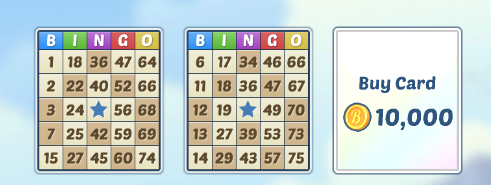
Once you’re in a room you’ll see slots for each available card. Click the slot to purchase a card. You can also turn on Auto Buy in automatic rooms for as many slots as you wish – this will automatically purchase a card for each round until you join a new room or close the game.
Once you have your cards, you can start daubing! Watch for the numbered balls at the top of the game. If you see one that appears on one of your cards, click on it on the card – this will cover the number up with your dauber. If you’re in an automatic room, all the numbers which are drawn will be automatically daubed.
If you miss a ball you can click on ‘All Balls’ to see a list of all the numbers which have been drawn so far this round.
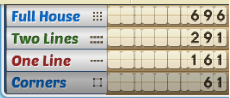
All the available prizes are shown in the top right of the room. When you daub all the numbers needed to win a prize, the game will automatically award this to you.
▶
How do I join a room?
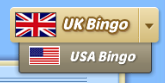
When you open the game, you can choose UK or US style bingo, and you can move between these at any time by using the switch in the top right.
You’ll see a list of rooms. You can switch between manual and automatic rooms using the tabs at the top of the room list.
Click ‘Join’ next to the room you want to enter. You are now in this room and will stay in it until you reload the game or join a different room.
The rooms are divided into tiers - at the top of the tier you will see icons showing how many coins a card costs in a room in that tier, and how many cards you can have in any room there. You will also see a little ‘A’ icon if the rooms in that tier are automatic rooms.
▶
What do the numbers next to the little people mean on the room list?
The numbers next to each room show how many people are in that room - the green person shows the total number of players in the room, and the blue person shows how many of them are on your friends list.
▶
If I leave a room will I lose my current cards?
When you leave a room to look at the room list (using the back button), any cards you are playing will stay active. If the room is an automatic room, your numbers will continue to be daubed and you can continue to win prizes. If a new round starts and you have auto buy turned on for any cards, these cards will be bought automatically.
However, if you then join a new room while you have active cards in a different room, the cards from the old room will be lost.
The room you are currently playing in will always be highlighted in gold, and you can go back to it by clicking the Resume button, or by clicking the Return to Room button at the bottom of the game.
▶
How do the Jackpot rounds work?
As you play bingo, you’ll see the Jackpot Bar at the bottom of the screen under your cards, or at the bottom of each tier in the room list.
This will get filled up as time passes and players purchase cards - once the Jackpot Bar has filled up, the next round will be a special Jackpot round where all the rooms in the tier play together and the prizes are bigger! You’ll see a countdown while you wait for the other rooms in the tier to finish their rounds.
▶
How do I change my dauber?
Click on ‘Menu’ then click ‘Daubers’ - here you’ll see a list of all available daubers, including ones you’ve unlocked or purchased in the past. You’ll also see other daubers which are available to purchase. Click ‘Use’ underneath the dauber you want to use.
▶
How do I add or change the tagline under my name?
Click on ‘Menu’ then on ‘Your Profile’. Click in the box with speech marks around it and type your tagline. Then click ‘Close’ - your tagline will be automatically saved.
Your tagline can say anything you wish - a hello message, funny quote or support for your favourite sports team… it’s up to you! Please keep your tagline friendly. You can change your tagline at any time.
▶
How are the prize pots decided?
The Coins you will win for each prize are shown in the top right of the room when you’re playing.
Each time someone purchases a card with Coins, the prize pots increase - so more cards bought equals bigger prizes!
▶
Can I play the game with friends?
You can add friends in Jackpot Bingo to make it easier to find and play games with them.
To add a new friend, click on the person’s name in the game and choose ‘View Profile...’ Then scroll down and click ‘Add Friend’. This player will receive a friend request in their game and will show up on your friends list once they accept the request.
If a fellow player has sent you a friend request, this will show up in your friends list. To accept their request, press the green check mark button next to their name.
To remove a friend/unfriend someone, click on the person’s name in your friends list, then scroll down their profile and click ‘Un-Friend’.
▶
How do gifts work in the game?
Once each day, you can send free coins to up to 50 of your friends! To do this, go to Menu, Gifts, Send Gifts. These coins are free, so they aren’t taken from your coin total.
The friends shown will be the 50 friends who've played Jackpot Bingo most recently. You can only send gifts once each day, so make sure to select all the friends you want to send gifts to at once.
▶
What are the different types of chat and how do I move between them?
Above the chat space you will see buttons for all of the chats you currently have open. You’ll always see a button for the room chat (everyone in the same room as you) and the global chat (everyone who’s playing right now).
You’ll also see buttons for any private chats you have open, and if you have a VIP Membership you’ll see a button for the VIP chat.
Click these buttons to move between the chats. A little number in the bottom left of the chat button will show you how many new messages there are in this chat. The chat that you are currently in will be highlighted, and you can close any private chats by hovering over the button and clicking the X which appears in the top right.
To start a new private chat with someone, click on their name and choose ‘Private Chat’. You can also start a private chat with any of your friends in the game by opening your friends list and clicking on the blue speech bubble button next to their name. If your friend is offline they will see your messages when they next open the game.
▶
I don’t like what somebody is saying in chat or want to stop someone messaging me.
If you don’t like what someone is saying in the chat you can mute them. To do this, click on their name and choose ‘Mute’. While a player is muted they will not be able to message you privately, and their messages will not show up in public chats. Muting is temporary, so any players you have muted will automatically be unmuted the next time you refresh the game - if you want to unmute a player before this, click on their name and choose ‘Unmute’.
You can also block someone from messaging you - you can do this by clicking on their name and choosing ‘View Profile…’, then scrolling down and clicking ‘Block’. This player will no longer be able to message you privately, and their messages will not show up in public chats. Players will stay blocked permanently unless you unblock them. To unblock a player, click their name in the game and choose ‘View Profile...’ then scroll down and click ‘Unblock’.
▶
Are there rules for chat?
When using chat, please treat other players with respect and avoid spamming. Words or phrases that we consider to be offensive may be starred out. Sending abusive messages or spam may result in warnings or a ban from chat.
The Jackpot Bingo chat is a positive community where you can go to make friends and have fun. If you find that you do not like what somebody is saying in chat you can mute or block them.
▶
Technical Support
I’m having trouble loading the game, what should I do?
There are several suggestions/troubleshooting options you can try when your game is not loading. Please try the following steps:
1. We recommend that you, first of all, try playing in another browser (E.g if you are using Microsoft Edge for example, then try Google Chrome, Mozilla Firefox, or Opera and vice versa.)
2. Now please visit this link for help in clarifying whether your browser is all up to date. If the browser is not up to date then simply click on the Update button to install the latest version.
3. We also recommend closing all extra tabs and other programs whilst you play as these can often negatively impact the browser performance.
4. Also make sure that you clear the browser cache regularly.
Still not working? Jackpot Bingo or the service you log in with might be having server problems, so wait for a while and try again. If all else fails, let us know and we will try and help you further.
▶
How do I turn off the sound in the game?
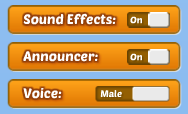
You can turn the sound effects and announcer off using the buttons at the bottom of the game's menu.
▶
I have lost my game progress, what should I do?
It’s likely that you've logged in with a different account than the one your progress is saved to. Please try using the 'Switch user' link in the top right of the page to log out, and log in with a different method to try to locate your progress. If you're still having trouble after this, please use the 'Contact Us' link under 'Menu', 'Help and Support' to reach out to our team for further assistance.
▶
Misc
Where can I play Jackpot Bingo?
You can play the game in your browser on our website. Unfortunately the game is not currently available for iPhone, iPad or Android devices.
▶
How can I keep up to date with the latest news and offers from Jackpot Bingo?
We keep our players up to date with news, game updates and offers on our Jackpot Bingo Community Facebook page which you can find here. Make sure you Like and Follow the page there to be the first to see our updates.
▶
How often do you have special events?
We normally have one special event per week. During a special event you will either get double payouts (Coins) for every prize won or double XP for every game played. Our events normally last for twenty-four hours. When an event is running, you will see a pop up letting you know about it when you open the game - this pop up will also show a timer counting down to the end of the event.
▶
Is the game available in other languages?
The game is only available in English, however, most of the game is number based which allows players from all over the world to access and enjoy it; we have lots of players who speak different languages and still enjoy the game a lot!
If you have any questions, please do let us know and we’ll do our best to help!
▶
What are Coins? How do I get more?
Coins are used to purchase bingo cards, drinks and new special daubers.
You earn Coins when you win a prize on one of your bingo cards. You can also get a Coin bonus just for playing! Each day that you log in you’ll get a daily bonus, and this will increase for each consecutive day that you play up to a maximum bonus of 80%!! You can claim this bonus again throughout the day – the timer at the top of the game will show you when your next bonus is due.
Coins can also be purchased in the game, all you need to do is press the '+' button next to your Coin total at the top of the game. Purchasing Coins is completely safe; each purchase is processed securely by Stripe. We do not have access to any of your payment details.
▶
Why do I have to pay for Coins? They should be free!
Jackpot Bingo costs money to make and keep running. We have to pay developers and rent servers - basically we need players to support us so we can keep the game running for everyone.
We know some players can’t or choose not to purchase Coins - it’s possible to play the game without buying anything, you just won't be able to play as often in our paid rooms. We’re really thankful to the players who choose to support the game by purchasing Coins!
▶
Can I buy a gift of Coins for a friend?
This is not currently an option in the game.
▶
I play on a computer and my currency isn't listed.
There are a limited number of currencies available to choose from for the prices displayed in the game. However, if your currency is not listed please select a different one and then choose the amount of Coins you'd like to purchase.
Once you've done this, a purchase window from Stripe/Link will appear and this should show the price in your correct local currency based on your location. You'll be able to see the cost and confirm that the currency is correct here, before deciding whether to enter your payment information and go ahead with the purchase.
▶
Can I withdraw my winnings from Jackpot Bingo?
Jackpot Bingo is a just for fun game, so no 'real money gambling' is involved. There are no real money winnings or prizes, and Coins cannot be withdrawn from the game.
▶
What is VIP Membership and how do I get it?
VIP Membership gives you access to exclusive VIP only rooms! It also gives you access to special VIP drinks, daubers and smileys. You’ll also receive a whopping 100% extra Coins on all Coin purchases, plus you’ll get to chat in our special VIP chat!
To get VIP Membership, open the Menu and click ‘VIP Membership’. Here you can choose your membership length - one month, three months or one year. These payment options are pay as you go, so you will get VIP Membership for your chosen time period, and at the end of this time period your membership will automatically stop. After they expire, you can come back to the Menu to purchase more months of membership if you wish.
▶
Will I have to pay every month if I get VIP Membership?
All current membership options in the game are pay as you go. This means you will get VIP Membership for the chosen time period, starting from when you buy the membership, and at the end of this time your membership will automatically stop. You will not be automatically charged again if you choose the pay as you go option, but you can if you wish choose to purchase more months of membership once your current membership has stopped.
▶
How can I report a security vulnerability in the game?
How can I contact your support team to ask a question?
If you can’t find the answer to your question here in the FAQs and still need help, get in touch. You can send us a message using the ‘Contact Us’ button under 'Help and Support' in the game's Menu.